Virtual reality operator training
Practise the job before the real job.
Give operators a place to practise a procedure, explore the equipment, and work through the sequence before their first supervised job on the floor.
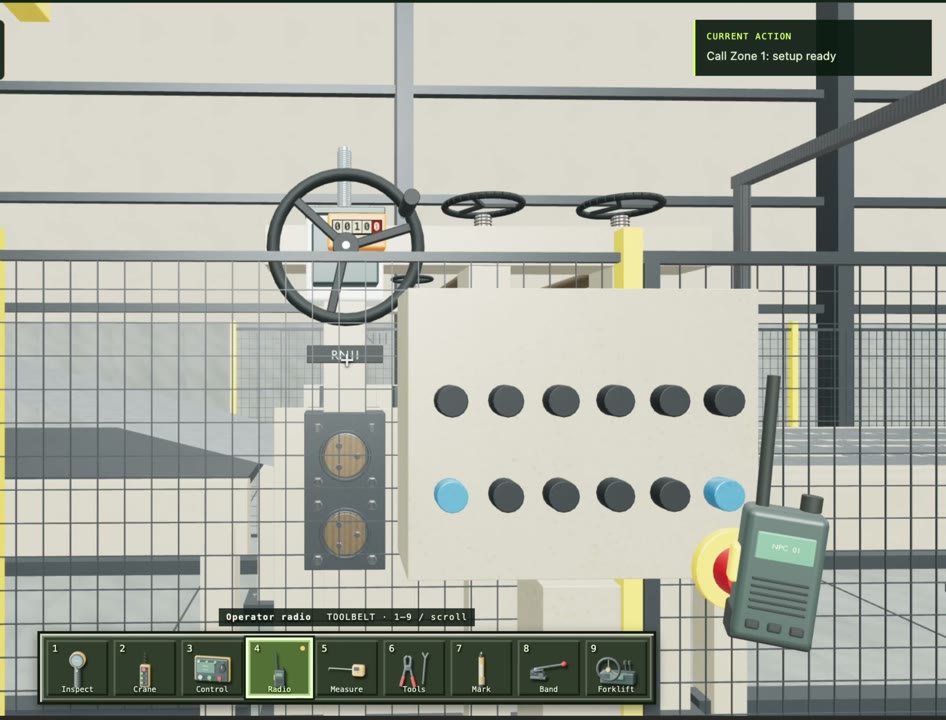
Learn the sequence
Practise the order of work and the checks that belong to each step.
Understand the equipment
Use 3D references to understand part positioning and the work area.
Connect to real work
Carry the same procedure into trainer-led assessment and floor instructions.
01 / VR Training
Where VR fits in manufacturing training
Reading a procedure and being able to perform it are different things. Virtual reality training adds a space to practise the sequence and develop an understanding of parts, positioning, and expected results. It is especially useful when access to the production machine or an available trainer is limited.
Start with a task where spatial understanding matters. An assembly sequence, equipment familiarization exercise, or setup walkthrough gives the training a concrete purpose. A realistic-looking scene is useful only when the operator can practise the actions and decisions that matter to that job.
02 / VR Training
One procedure across the training journey
Seneca connects computer-based learning, VR practice, in-person assessment, and smart-glasses guidance around a shared procedure. The computer-based stage explains the job and checks understanding. VR gives the operator a way to rehearse the sequence. A trainer then observes performance on the actual work.
This gives the supervisor more context than a quiz score alone. Review which steps the operator understands, where practice is needed, and what was demonstrated in person before making the readiness decision.
03 / VR Training
Evaluate the practice, then verify the performance
Define observable completion criteria for the VR exercise. These can include selecting the right component, following a required order, placing a part correctly, and completing the relevant checks. Record where the operator needed help so the next training session has a clear focus.
Physical feel, force, tool handling, and machine-specific behavior may still require practice on real equipment. Keep that practical assessment in the learning path. When a process changes, review both the VR scenario and the instructor’s assessment criteria against the new instruction.
Questions
Before you start.
Does VR replace a trainer?
VR supports practice and preparation. A trainer still evaluates the operator on real equipment before authorizing independent work.
Is VR training linked to SOPs?
Seneca connects the training journey to the work procedure, so the sequence and checks can be reviewed together.
Can we see a VR training example?
The operator training page includes a virtual reality demonstration alongside computer-based, in-person, and smart-glasses training.
See Seneca at work
Bring us one job.
Start there.
Show us the procedure, training need, or production workflow you want to improve.